

Quick Answer
A task list tracks what needs to be done. A project management system tracks who owns it, when it’s due, what it depends on, and whether it’s slipping — without anyone having to ask. The difference shows up the moment more than one project is running at once, or the person holding the list goes on leave. For growing businesses still running projects out of a shared sheet, this is where deadlines quietly start slipping before anyone notices.
Where the task list stops working
One person keeps the master task list — a shared Excel sheet, a Google Doc, sometimes a notebook. It works fine when there are five people and one project.
It stops working the moment the team crosses ten people, three projects run in parallel, and that one person goes on leave, gets pulled into a client escalation, or leaves the company. Tasks get duplicated. Two people update the same row differently. Nobody can say, without asking three people, what is overdue right now.
The list was never the problem. It was built for a smaller business than the one you run today. A project management system exists to hold what a task list was never built to hold.
The moment a business needs to move from a task list to a project management system usually shows up as one of these:
- Ownership becomes unclear. A task sits on the list with no single owner, or two people think they own it.
- Dependencies aren’t visible. Task B can’t start until Task A finishes, but the list has no way to show that — so B starts late, or starts wrong.
- Status lives in someone’s head. The real project status is “ask Mehul,” not something anyone can check without a WhatsApp message.
- Reporting takes half a day. When the Director asks “where do we stand,” someone spends an afternoon compiling an update from three different sheets.
- Deadlines slip silently. A task list shows what’s due. It doesn’t flag what’s already late or blocked — someone has to notice, and usually notices too late.
A shared sheet records the work. It cannot watch the work.
Still running projects on a shared sheet?
See what changes when task ownership and deadlines live in a system instead of someone’s memory.
Talk to Our Team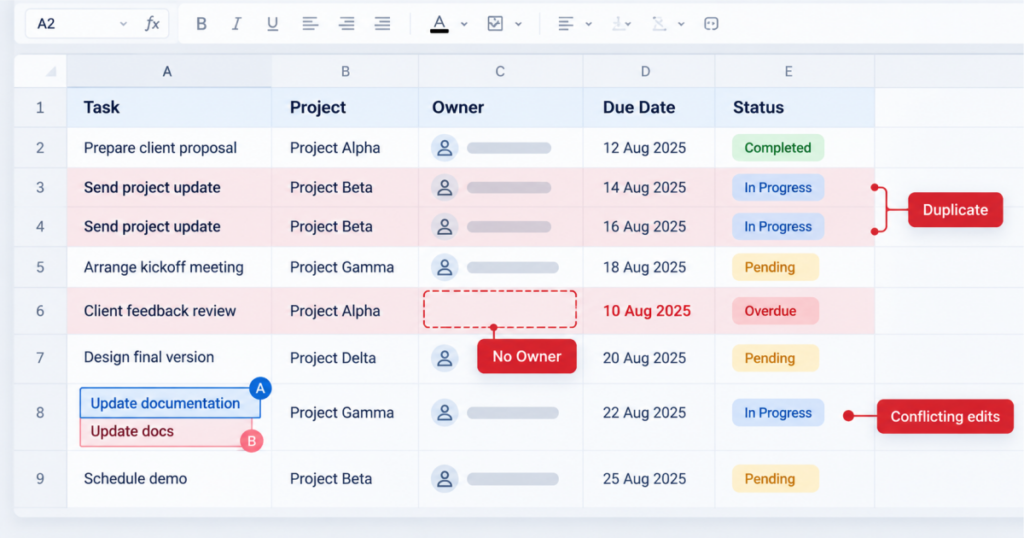
What changes with a project management system
The difference isn’t the interface. It’s what the system is built to hold.
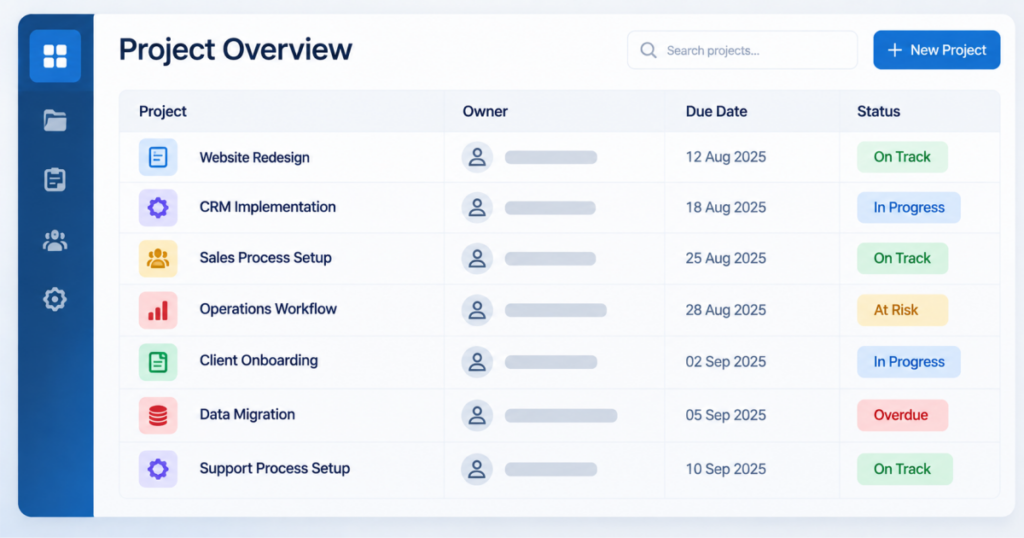
A task list is a flat record — a row per task, updated by hand, with no link between rows. A project management system ties each task to an owner, a due date, the tasks it depends on, and a project record that pulls all of it together in one view.
That means:
- Overdue tasks show up on their own — no one has to scan the sheet to spot them.
- Dependencies are visible. Everyone can see which task is waiting on which, and who is holding it up.
- Status sits at project level on a dashboard. The Director’s question gets answered in a screen, not an afternoon.
- Handovers survive people leaving. When the person who ran the sheet is out, the project doesn’t stall — the system already knows who owns what.
Most businesses outgrow the task list at the exact point they are growing fastest. That is the worst possible time for tracking to fail.
What this looks like in a growing business
A team running two or three client projects at once, each with its own internal owner, is usually the first place this breaks. One project’s tasks live in a shared sheet. Another lives in someone’s inbox as flagged emails. A third is tracked verbally in a weekly call.
Leadership asks for a combined view of what’s on track and what’s slipping across all three — and the honest answer takes a day to assemble, because no single system holds all three projects the same way.
The cost is rarely one big failure. It is a steady run of small ones. A client hears about a delay after the deadline, not before. Two people spend a morning on the same task. A handover note gets lost in a WhatsApp group. The team starts spending as much time reporting on the work as doing it.
A project management system doesn’t remove the need for a person to manage the work. It removes the need for a person to hold the tracking in their head, in a sheet, or in a notebook — so the work still moves when that person is unavailable, and leadership gets a clear answer without waiting for someone to compile one. If your sales and support teams already run on a structured system like TargetCRM, project tracking is the natural next step.
One system, not three sheets and a weekly call
See how project and task tracking can sit inside the same system your team already works in.
Book a WalkthroughMaking the shift without disrupting the team
Moving off a task list doesn’t require a big-bang rollout. The businesses that make this shift cleanly usually do it in this order:
- Move one active project into the system first — not the whole backlog at once.
- Assign owners and dependencies as the project is set up, not retrofitted later.
- Keep the weekly status call, but use it to review the system’s view — not rebuild it verbally.
- Add the next project once the first is running cleanly.
How long this takes depends on your project management setup — how many projects, how many people, and how much history you want to bring across. Starting with one live project keeps the first step small. For more on why structure has to come before scale, read why operational efficiency comes before chasing more revenue.
A task list tells you what to do. A system tells you what’s happening.
If your team is tracking more than one project on a shared sheet, we can show you what changes.
Talk to Our TeamFAQ HUB
A task list is a flat record of what needs doing. A project management system links each task to an owner, a due date, and the tasks it depends on, and shows status for the whole project in one view. The practical difference is that nobody has to chase people or compile updates by hand to know where things stand.
Usually once more than one project runs at the same time, the team crosses roughly ten people, or leadership starts asking for status updates that take more than a few minutes to compile. Another clear sign is when a project stalls because the one person who maintains the sheet is on leave or busy elsewhere.
For project tracking, yes. The gaps a sheet cannot close are ownership, dependency visibility, and a live status view across projects. A system holds all three without anyone updating rows by hand. Many teams still export data to Excel for one-off analysis, but the day-to-day tracking moves into the system.
No. The cleanest adoptions move one active project in first, then expand. Your team keeps its existing way of working — the same weekly call, the same owners — but the tracking moves out of the sheet and into the system. Once the first project runs cleanly, the next one follows the same pattern.
It depends on how many projects and people are involved, and how much past data you want to bring in. The fastest route is to start with one live project rather than migrating the full backlog. We walk through scope with your team first, and give a clear timeline once we know what is going in.
With a task list, the project often stalls until that person returns, because the real status lives with them. With a project management system, ownership, due dates, and progress are already recorded, so anyone on the team can see what is pending, pick up the next step, and keep the work moving.