
Quick Answer
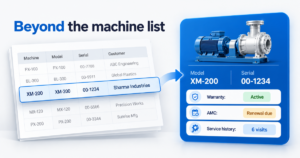
Installed base management means keeping one record for every machine you have sold: who owns it, where it is installed, its warranty status, its AMC contract, its service history and the spares used. It is not a machine list. It is the record that tells your sales, service and dealer teams what each customer holds and what is due next. For machinery businesses tracking this in Excel, this is where recurring service revenue leaks. A structured record inside a CRM stops that leakage before it reaches the MD’s desk.
One person owns the machine list. Usually it is a service coordinator who has kept the Excel sheet for years. That works while the business is small. Installed base management starts where that sheet stops. The coordinator goes on leave, and a warranty expires unnoticed. A customer calls about a machine installed three years ago, and nobody can say which spares went into it. Growth adds machines faster than one sheet can track.
What Does Asset Management Mean for a Machinery Business?
Ask a service head what the asset is, and the answer is usually the machine. A mixer, a conveyor line, a pump skid. That is half the picture.
For the business that sold it, the asset is the machine plus everything attached to it. The warranty that is running. The AMC contract that is due. The spares fitted on the last visit. The engineer who attended and what was found. The dealer who sold it and the customer who now runs it.
Remove any of these and the record is just a serial number. The value sits in the connections. That is why installed base management matters more as you grow. A few dozen machines can be remembered. A few hundred, spread across dealers and states, cannot.
Machinery is the clearest example, but the rule is wider. Any growing business that keeps serving what it sold, whether equipment, software licences or service contracts, needs the same kind of record.
Why a Machine List Is Not Installed Base Management
Most Excel sheets begin as a list of machines sold. The trouble starts because a list records what happened once, while installed base management tracks what keeps happening. Here is where the list breaks:
- The warranty end date sits in a column, and nobody is alerted. The warranty ends, and the customer is never offered an AMC at the moment they are most likely to say yes.
- AMC renewals depend on one person’s memory. Contracts lapse quietly. The customer calls another service provider, and you find out only when the next breakdown call does not come to you.
- Service history lives in WhatsApp groups. The engineer who visited last month knows what was replaced. Nobody else does. The next engineer arrives without the history.
- Dealer-sold machines never reach the sheet. The dealer installs, the customer calls you for service, and you have no record of the machine at all.
A list remembers the sale. It does not watch the machine.
A reminder kept by a person fails when the person is away. The system owns the reminder, not a person.
Is your machine list still in Excel?
See how a structured machine record handles warranty and AMC dates.
Talk to Our Team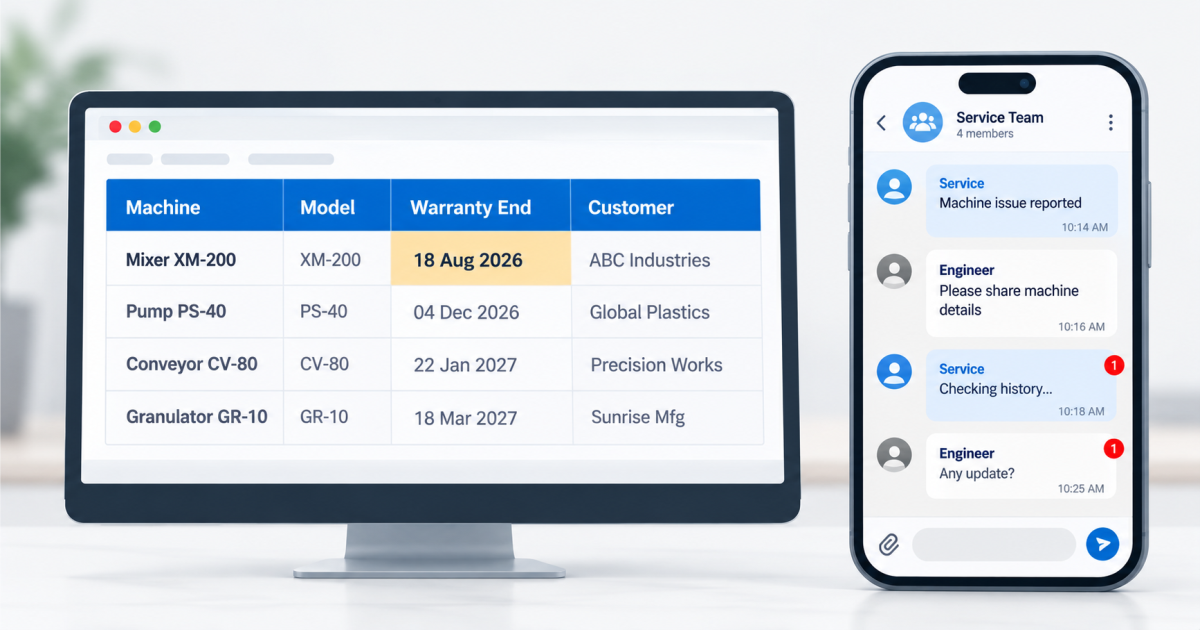
What an Installed Base Record Should Hold
A working record is built around the machine, not the sale. For installed base management to be useful, each machine carries these:
- Identity and installation: model, serial number, installation date and site.
- Ownership: the customer, the contact at site, and the dealer who sold it.
- Warranty status: start date, end date and what it covers.
- AMC contract: type, period, renewal date and the person responsible.
- Service and spares history: every ticket, every visit, every part fitted.
Notice what ties these together. Each item links back to the same machine. A service ticket opened on a WhatsApp message is a complaint. A service ticket opened against a machine record is history. Understanding warranty terms per machine is the starting point for knowing when to offer an AMC.

How Installed Base Management Changes the Daily Work
The record changes what each team sees when they open it.
The service head sees a due list: warranties ending this month, AMC renewals in the next sixty days, tickets open against a machine. They stop chasing and start planning engineer visits.
The sales head sees which customers run older machines. That is a conversation about spares, upgrades or a replacement, started from facts instead of guesswork.
The dealer coordinator sees which machines were sold through which dealer, so every installation lands in the record from day one.
The MD sees one view. How many machines are under AMC. How many are out of warranty with no contract. Which service tickets are open past their date. No more waiting two days for someone to assemble it from three files.
None of this needs a bigger team. It needs the machine to be the centre of the record.
See the installed machine record in EngiFlow360
Walk through one machine, from quotation to AMC renewal, in a working demo.
Book a Machine Record WalkthroughWhere to Start Without Rebuilding Everything
You do not need to enter every machine you have ever sold on the first day. Start where revenue is closest.
First, the machines currently under AMC or about to leave warranty. These carry the nearest renewal revenue. Second, machines sold this year, so new installations enter the record cleanly. Third, older machines, added as service visits happen.
Before any software, agree on one rule: no machine is sold, installed or serviced without a record. That rule is what makes the data trustworthy.
EngiFlow360 is built around this record. It links the quotation, order, installation, service tickets, AMC and spares to each machine, so the history follows the machine and not a person. Timelines depend on scope, users and data, and we discuss them in the proposal.
Installed base management is not an IT project. It is how a growing machinery business protects the service revenue it has already earned.
Growth should not depend on one person’s Excel sheet.
Talk to ECS about putting that record into a system. For machinery businesses, that system is EngiFlow360.
Talk to Our TeamFAQ HUB
Installed base management is keeping a single record for every machine you have sold. That record holds the owner, site, warranty, AMC contract, service history and spares used. It lets sales, service and dealer teams see what each customer holds and what action is due next, instead of searching Excel sheets and WhatsApp groups.
For a machinery company, asset management usually means tracking the machines you have sold, which is the installed base. The difference is scope. A machine list records the sale. Installed base management also tracks warranty, AMC renewals, service tickets and spares against each machine over its working life. As the business grows, that wider record is what keeps service revenue from slipping.
Excel can store a machine list, but it struggles to manage one. It does not alert anyone when a warranty ends, does not link service tickets to machines, and depends on whoever maintains the file. It works for a small number of machines. It breaks as dealers, branches and service engineers are added.
Each record should include the machine’s model, serial number, installation date and site, the customer and dealer, warranty dates, AMC contract details, and the complete service and spares history. The key requirement is that every service ticket and visit is linked to the machine, so history is never lost. Start with machines under AMC or near the end of warranty.
It puts every renewal date next to the machine and assigns it an owner with a reminder. The service head sees upcoming renewals in one list, not in someone’s memory. Renewals stop depending on one person being available, which is where most lapsed AMC contracts begin. The customer gets the renewal offer before the contract ends, not after.
The service head usually owns it day to day, with sales and dealer teams adding machines at the point of sale. The MD should have visibility but not maintain it. Ownership works best when a rule is set: no machine is sold or serviced without a record. That rule matters more than the software.