

Quick Answer
When choosing a CRM for a 50–200 employee business, the right one is the system your sales, service and management teams will use every day, set up around how you already work, and supported after go-live. Fit, adoption and support matter more than the length of the feature list. For businesses that have already tried one CRM and drifted back to Excel, this is where the second purchase usually fails the same way as the first.
One sales head chooses the CRM. Usually it is the person who sat through three vendor demos in a busy quarter, between closing deals and chasing payments. That person picks the system with the best-looking dashboard. Six months later, the field team is back on Excel, because nobody checked whether they could update it from a phone. Choosing a CRM this way is common, and the renewal invoice arrives for a system nobody opens.
Why CRM choices fail in a 50–200 employee business
A business of this size is too big to run on Excel and WhatsApp, and too small to run a six-month enterprise rollout. That middle ground is where most CRM decisions go wrong:
- The CRM was chosen from a demo, not a workflow. The vendor showed their best screens. Nobody asked them to run your enquiry-to-quotation process with your data.
- It was built for a different size of business. Enterprise systems need an IT team to run them. Tools built for five-person teams break when you add branches, dealers and approval levels.
- The field team cannot use it. Salespeople and service engineers who live on the road need a phone screen that takes thirty seconds, not a laptop form.
- Nobody owns adoption inside the company. The CRM goes live, the vendor leaves, and no one checks whether follow-ups are being logged.
- Support stops at go-live. Questions go to a ticket queue in another time zone, and small problems become reasons to stop using the system.
- The data is hard to get out. When the business wants to change, it discovers its own customer history is difficult to export.
The demo is not the decision. The first ninety days are.
Already tried one CRM and gone back to Excel?
Talk to us about what went wrong last time, before you choose again.
Six things that matter when choosing a CRM
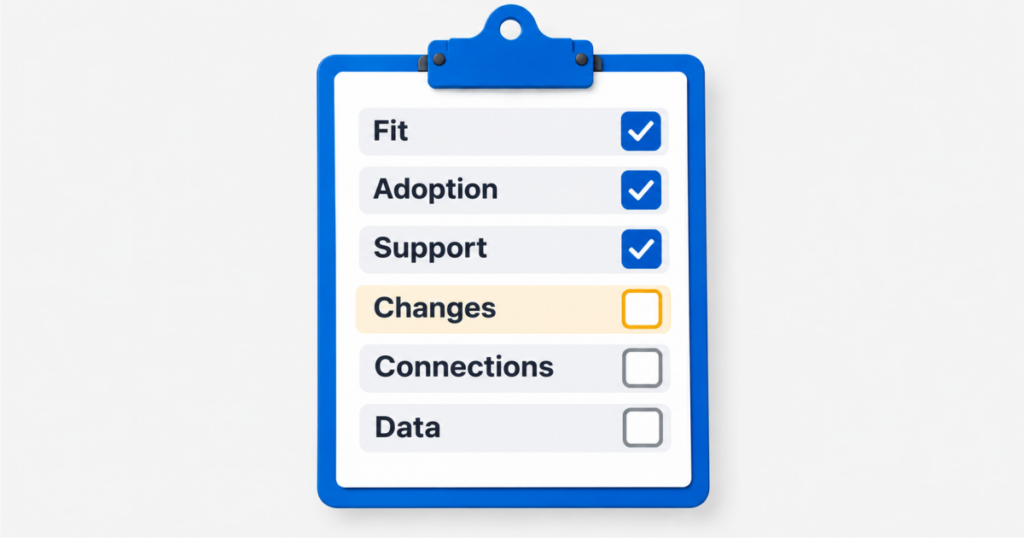
The useful questions are about your business, not the vendor’s feature page. For a 50–200 employee team, check these six:
- Fit to your real workflow. Map your journey from enquiry to quotation to order to service. A general sales business needs a different CRM from a machinery business with installations, AMCs and dealers.
- Adoption by the people who enter data. The CRM succeeds or fails with salespeople and service engineers. If they cannot log a visit or a follow-up from a phone in under a minute, they will not.
- Implementation and support close to you. Ask who sets it up, who trains your team, and who you call six months after go-live. A partner in your time zone, who understands Indian business practice, changes how quickly problems get fixed.
- Changes without custom development. Your approval levels, fields and reports will change as you grow. Check that these can be adjusted in settings, not only by paying for new code.
- Connections to what you already run. Most businesses this size already have an accounting or ERP system, email, website forms and WhatsApp. Ask each vendor to show how enquiries and orders move between them.
- Ownership of your data. Know where your data is hosted, who can access it, and how you would export all of it if you ever leave.
Fit and adoption decide the outcome. Features only decide the demo.
What matters less than vendors suggest
When choosing a CRM, some things look important in a sales meeting and rarely decide whether it works:
- The number of features. A 50–200 employee business uses a small set every day. Unused modules add training time, not value.
- AI badges. Predictive features only help when your records are complete. Read why predictive analytics for SMEs starts with your records, not the tool.
- The lowest price per user. A cheaper licence that nobody uses costs more than a system the whole team opens every day.
- Logos of large global customers. Ask instead for a reference from a business your size, in your industry.
The cheapest CRM is the one your team opens every day.
See a CRM run on your workflow, not a sample one
Bring your enquiry-to-order process and we will walk you through it in TargetCRM or EngiFlow360.
A simple way to run your CRM evaluation
Choosing a CRM does not need a committee or a consultant’s report. Five steps are enough:
- Write down your top three workflows. For example, enquiry to quotation, order to installation, complaint to closure.
- Ask each vendor to demo those three, with your data. A generic demo tells you about the product, not your fit.
- Give it to two real users for a week. One salesperson and one service or operations person. Their feedback outweighs any feature list.
- Ask for the go-live plan in writing. Who does what, by when, and who supports you afterwards.
- Check the exit. Confirm you can export your data in a usable format.
ECS builds two CRMs for businesses of this size. TargetCRM is a practical CRM for growing sales and service teams. EngiFlow360 is built for machinery, equipment and engineering businesses with installed bases, AMCs and dealers. For standard lead, follow-up, quotation and reporting workflows, a CRM can be set up in around 30 days when scope, users and data are ready.
Years of CRM work have taught us that the right choice is rarely the system with the most features. It is the one that still has every salesperson logged in a year later. For why that structure matters before growth, read why operational efficiency comes before chasing more revenue.
Choose the CRM your team will still use a year from now.
Talk to our team about your workflows, your users and your support needs before you compare feature lists.
FAQ HUB
Start with your workflows, not the vendor’s features. Write down your top three processes, ask each vendor to demo those with your data, let two real users try it for a week, and get the go-live and support plan in writing. Choose the CRM your sales and service teams will use daily, not the one with the longest feature list.
Adoption. A CRM only works if the people who create the data, usually salespeople and service engineers, use it every day. That depends on fit to your workflow, a simple mobile experience, and support after go-live. A system with fewer features that everyone uses will outperform a powerful one that the team avoids.
If your workflow has industry-specific steps, yes. A machinery or equipment business that manages installations, AMCs, warranties and dealers needs those built in, or it will spend months customising a general CRM. A business whose process is mainly leads, follow-ups and quotations is usually well served by a practical general CRM.
It depends on scope. For standard lead, follow-up, quotation and reporting workflows, a CRM can be set up in around 30 days when scope, users and data are ready. Complex customisation, heavy integrations or large data migrations take longer, and the timeline should be agreed in the proposal before you start.
Most fail after go-live, not during selection. The usual causes are a system chosen from a demo rather than a real workflow, a field team that cannot use it on mobile, nobody inside the company owning adoption, and support that disappears once the vendor leaves. Each of these can be checked before you sign.
Usually, yes, but how well depends on the CRM and the system you run. Ask each vendor to show how enquiries, orders and customer details move between the CRM and your accounting or ERP software, using your setup. Do not accept a general “we integrate with everything” answer without seeing it work.