
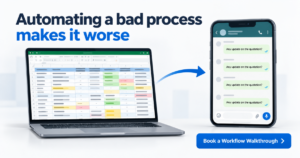
One person owns the quotation tracker. Usually it is a sales coordinator who has built the sheet over years, with colour codes only they understand. Then that person goes on leave. Follow-ups stop, approvals sit in WhatsApp, and a quotation worth lakhs goes cold.
The fix most MDs reach for is software. But automating a bad process does not remove the mess. It runs the mess faster, and now it has a login.
Quick Answer
Automating a bad process means putting unclear steps, missing owners and inconsistent data into software. The CRM then repeats those gaps at speed. You get faster follow-ups to the wrong people, reminders nobody acts on, and dashboards nobody trusts. The fix is to define the owner, the next step and the exit condition for each workflow first. For sales and service teams running on Excel and WhatsApp, this is where CRM projects quietly fail. A short process-mapping step before go-live stops that failure before it reaches the MD’s desk.
Why Automating a Bad Process Fails in Indian B2B Teams
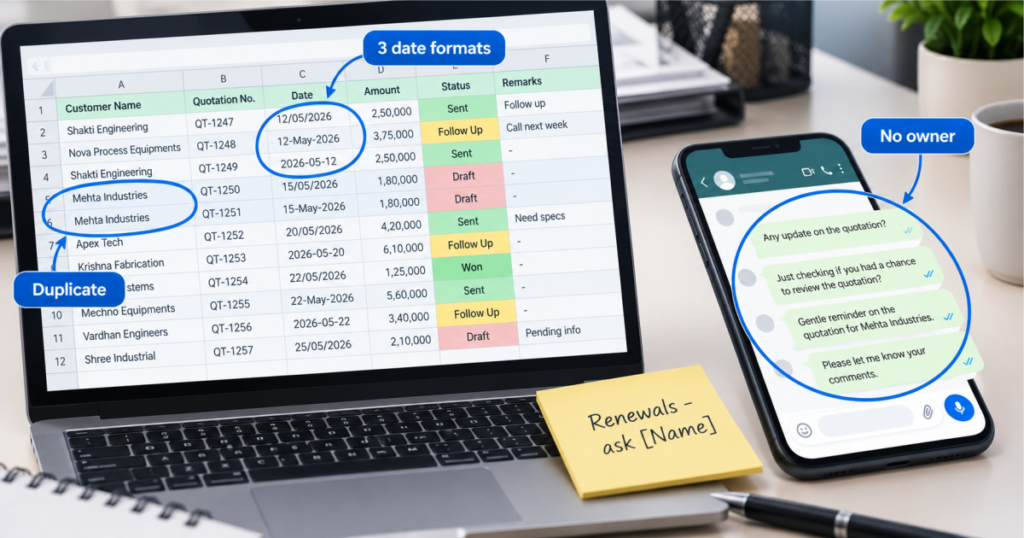
Excel and WhatsApp hide process problems. A person’s memory fills every gap. They know which dealer needs a call before the quotation goes out. They know which customer pays late and needs a reminder. None of that is written down.
A CRM cannot read memory. It only knows the fields, stages and rules you give it. If the real process lives in someone’s head, the system gets the wrong version.
This is not a question of discipline. It is a question of structure.
Teams usually discover this three months after go-live. Users stop updating the system, management stops trusting the reports, and the project is called a failure. In most cases the software worked as configured. The process behind it was never defined. This is the pattern behind most CRM implementation failure stories: bad input, processed faster.
Four Ways a Broken Process Breaks Inside a CRM
When you automate a process nobody has defined, these are the failures that show up first:
- No single owner per step. The lead is “with sales.” The complaint is “with service.” Nobody’s name is on the next action, so the automated reminder goes to a shared inbox and stays unread.
- Stages that mean different things to different people. One rep marks a lead “Hot” after a call. Another uses “Hot” after a quotation. The pipeline report looks complete and means nothing.
- Exceptions handled outside the system. Discounts approved on a phone call, a dealer’s special terms agreed on WhatsApp. The CRM shows one story and the business runs another.
- Dirty data carried over from Excel. Duplicate customers, half-filled contact details, renewal dates in three formats. Automation multiplies these records and every report inherits the error.
Each of these exists today in your Excel sheet. The CRM just makes them visible, and makes them hard to ignore.
Not sure where your process is breaking?
Walk through your lead, quotation or AMC flow with our team before you buy any software.
What to Fix Before You Automate
You do not need a six-month consulting exercise. You need four decisions made on paper, per workflow.
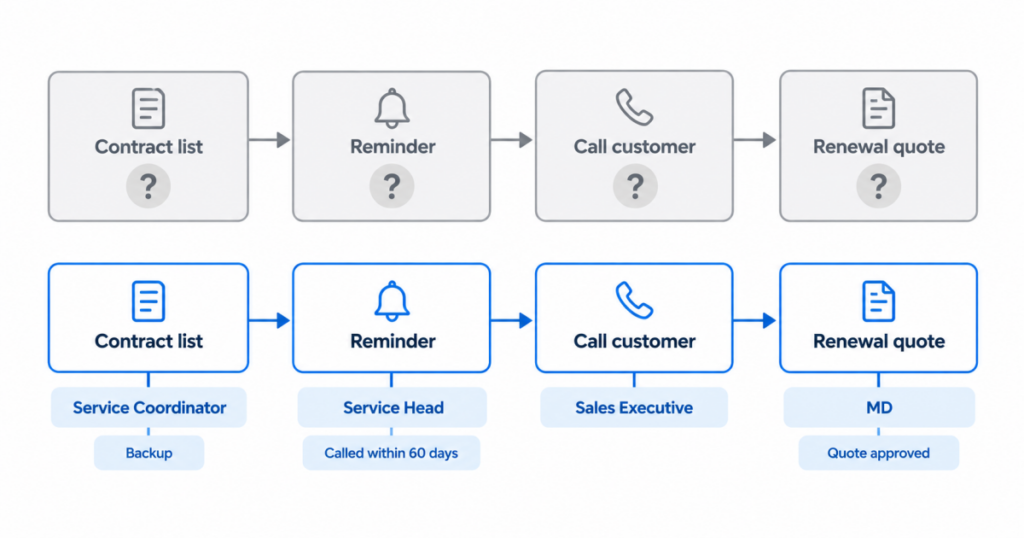
- Name the owner of every step. One person, not a department. If that person is away, name the backup.
- Define what each stage means. Write one sentence per stage that anyone on the team can apply the same way.
- Set the exit rule. When does a lead become a quotation? When does a quotation become lost? When does a service ticket close? If the answer is “depends,” the system cannot enforce it.
- List the exceptions. Discount approvals, dealer terms, urgent breakdowns. Decide which ones the system handles and which need a named approver.
Then clean the data. Merge duplicate customers. Fix the date formats. Remove records nobody has touched in years. This is a few days of work, not a project.
The system owns the reminder, not a person.
That sentence only holds true when the previous four steps are done. A reminder with no owner is noise.
What This Looks Like in Machinery and Sales Workflows
Take AMC renewals in a machinery business. The renewal list sits in a Google Sheet maintained by one person. Automating that sheet as-is gives you automatic emails on dates that may already be wrong, sent for machines whose contracts lapsed last year.
The better order is to list the installed machines first, confirm each contract’s start and end date, and decide who calls the customer 60 days out and who approves a renewal quote. Then automate. EngiFlow360 is built around this inquiry-to-AMC journey, so the stages already match how machinery businesses work. The mapping step still matters, because your dealers, your approval levels and your service territories are specific to you.
Sales teams in pharma, chemicals or B2B services face the same problem in a different place: follow-ups. Leads come from calls, WhatsApp and exhibitions. If the team has not agreed what “followed up” means, a TargetCRM pipeline will show activity without showing progress. Agree on the rule first. Then the reminders and dashboards have something real to enforce.
See your workflow mapped before go-live.
We will walk you through how your quotation or AMC flow would run in the system, step by step.
How to Map a Process Before CRM Go-Live
Process mapping sounds heavy. In practice it is one working session per workflow, with the people who actually do the work in the room, not only the Head.
Draw the current flow as it really runs today, including the WhatsApp steps. Mark every place where work waits on one person. Mark every place where data is typed twice. Then redraw the flow you want, with owners and exit rules. Business process mapping is a well-established technique, and a whiteboard is enough.
Start with the one workflow that hurts most. For machinery businesses that is usually AMC renewal or complaint handling. For sales teams it is usually lead follow-up. Get that one right, run it live, and add the next workflow after the team trusts the first.
For standard lead, follow-up, quotation, activity and reporting workflows, a CRM can be set up in around 30 days when scope, users and data are ready. That timeline only holds when the mapping is done first. Teams that skip it spend the same 30 days rebuilding configuration.
Fix the Process First, Then Automate
A CRM is a good tool for a clear process. It is a poor substitute for one.
If your team is on Excel and WhatsApp today, you are not behind. You are in the right place to decide how work should flow, before the software locks it in. Automating a bad process feels like progress for about a month. Mapping it first takes a few days and saves the rework that follows.
Pick one workflow. Write the owner, the stages and the exit rule. Then bring in the system.
CRM that fits how your team actually works.
We help Indian growing businesses map the process first, then set up the system and stay after go-live.
FAQ HUB
It means putting a broken or undefined workflow into software without fixing it first. The unclear owners, inconsistent stages and missing exit rules stay exactly as they were. The system simply repeats them faster, so errors spread and reports lose credibility. It is common when teams move from Excel to a CRM in a hurry.
Most fail because the process was never defined before setup. Teams configure stages and fields without agreeing who owns each step or what each stage means. Users then stop updating the system, and management stops trusting the data. Poor input, not faulty software, is usually the cause.
Yes, at least for the one workflow that hurts most. Name the owner of each step, define each stage and set the exit rule. This takes days, not months, and it makes setup faster and adoption stronger. Skipping it usually means rebuilding the configuration after go-live.
Ask three questions. Can anyone on the team name who owns the next step? Does each stage mean the same thing to everyone? Is the data clean enough to trust? If any answer is no, fix that first. One honest session with the people who do the work will answer all three.
For standard lead, follow-up, quotation, activity and reporting workflows, setup takes around 30 days when scope, users and data are ready. Complex customisation, heavy integrations or data-migration-heavy projects need a timeline agreed in the proposal. Mapping the process first keeps the setup on that timeline.
No. A CRM enforces a process, but it cannot design one. If the Excel process depends on one person’s memory, the CRM inherits that dependency. Map the workflow first, then let the system own the reminders. One workflow, mapped properly, is enough to start.